

How to solve Circular Relationships LOOP in Primavera P6
In Oracle Primavera P6, creating relationships between activities is a fundamental aspect of project planning. However, sometimes users encounter issues known as “Circular Relationships” or “Loops” during this process. These errors occur when there is a loop in the sequence of relationships between activities, causing a logical contradiction in the project schedule.
1. Reasons of Loops
Understanding the causes of circular relationships is essential for effective project planning and scheduling. These causes can include:
1. Overlapping Relationships: When activities are linked in a way that creates a loop, such as Activity A being linked to Activity B, which is then linked back to Activity A, a circular relationship occurs.
Ready to take your skills to the next level? 🚀 Check out our Special Online Courses! 🚀
Gain valuable insights, boost your career, and learn from industry experts.
2. Incorrect Logic: Mistakes in defining the logic of relationships between activities can lead to circular dependencies. For example, specifying that Activity A must finish before Activity B and Activity B must finish before Activity A, creates a logical contradiction.
3. Unintended Consequences: Sometimes, users create circular relationships while making changes to the project schedule or adjusting activity dependencies.
2. Approaches to be taken
To resolve circular relationship errors in Oracle Primavera P6, several approaches can be taken:
1. Review Relationships: Conduct a thorough review of the relationships between activities in the project schedule to identify any circular dependencies.
2. Adjust Logic: Modify the logic of relationships between activities to remove circular dependencies. This may involve resequencing activities or adjusting constraints to ensure a logical sequence of events.

Primavera Online Basic Course -English
Online Primavera P6 Course for Engineers & Construction Managers Learn how to use Oracle Primavera P6 to plan, schedule, monitor, and control…
- 5,497 students
- WhatsApp support group
- Certificate
3. Use Constraints: Utilize constraints in Primavera P6 to enforce specific timing requirements without creating circular dependencies. Constraints can help maintain the integrity of the project schedule while avoiding logical contradictions.
4. Utilize Lag or Lead: Introduce lag or lead time between activities to break potential loops and ensure a feasible project schedule.
3. Steps to Solve the Loops
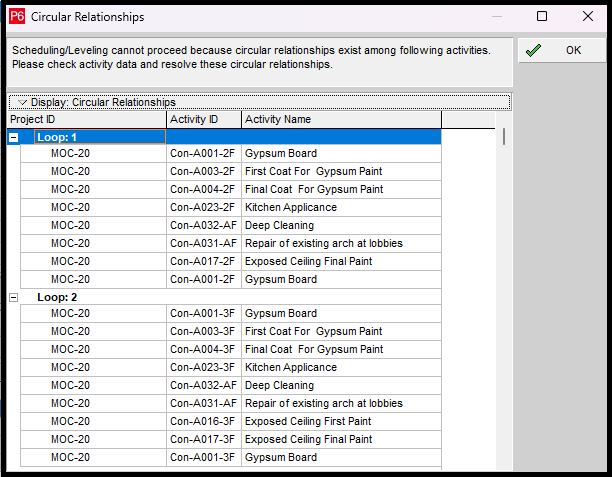
Once you schedule your schedule this Window will show Up, That’s indicate the loop you have
If you see the First Loop ” Loop: 1” you will see that the First Activity is the Last Which means that the Loop starts and ends in this Activity, Then the unlogical Relationship is with this Activity.
Once you break this relation the Loop will be solved
If you look at the below Picture of the Gypsum Board Activity and Its predecessor “Exposed Ceiling Final Coat” and Its successor “ First Coat for Gypsum Paint”
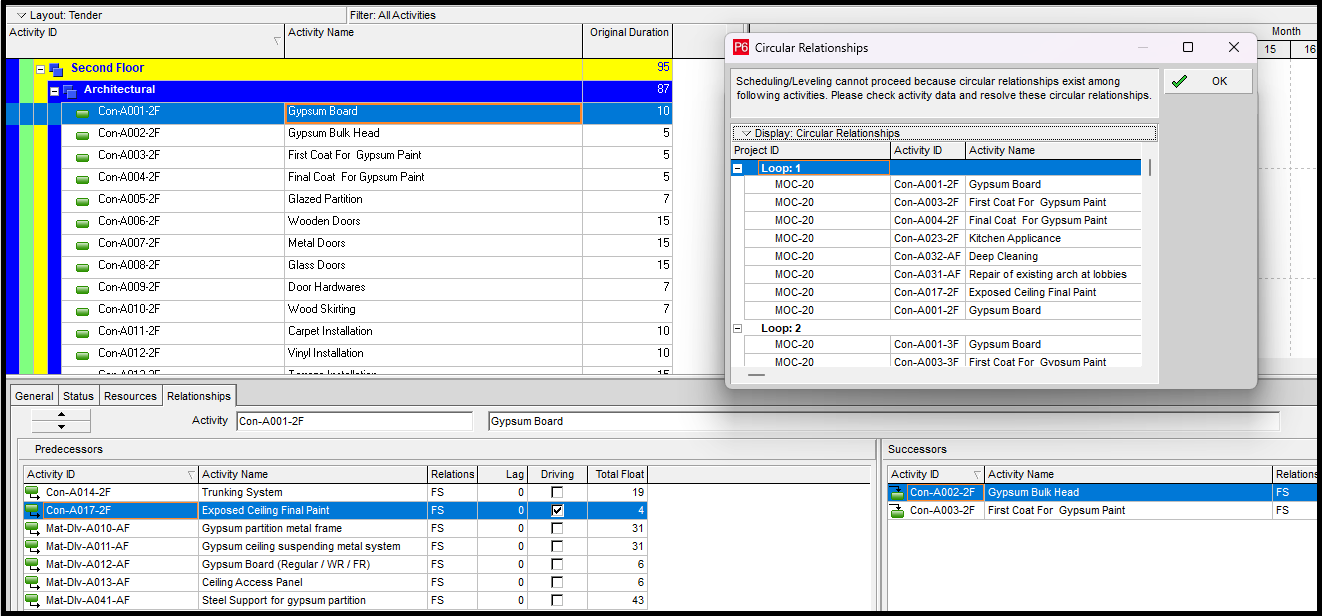
If you delete the Un logical relationship which is Exposed Ceiling Final Paint as the predecessor it’s no logic, how does the link the Exposed Ceiling Final Paint before the Gypsum Board?
Once you schedule again you will find no Loop and it will be scheduled Smoothly.
This Video will help you figure out the Loops and how to resolve it
Download the Resources of this Article
How to solve Circular Relationships LOOP in Primavera P6 270.39 KB 2660 downloads

Keep in Touch
Join our Email Newsletters and receive FREE weekly useful content!

Keep growing with Planning Engineer
Learn with a clear path
From Primavera P6 basics to claims, cost control and Power BI. Start with our free courses.
Browse coursesGet help on WhatsApp
Every course comes with a private WhatsApp support group where our team answers your questions.
Join a courseFind planning jobs
117 open planning and project control jobs. Post your resume so employers can find you.
See jobsGet tips by email
Free planning tips, templates and course offers. Unsubscribe any time.
Related posts:



You may also like

How to Minimize Total Float in Construction Activities

