
Planning Engineer Software
Beta Testing Program
Build a Bulletproof Project Baseline — In Hours, Not Weeks
PE Software automates BOQ cleaning, WBS creation, activity mapping, cost & resource loading, and CPM scheduling in one guided workflow — so your baseline is fast, consistent, and error-free from day one.
You’re invited to test PE Software before public release. Download the beta, activate it with the beta key, and share your feedback with us.
Welcome, Beta Testers
Thank you for helping us test PE Software. Follow these steps to install the beta, activate it, and send us your feedback.
Download the Beta
Download the latest beta installer for Windows using the button below.
Install PE Software
Run the installer and follow the setup steps. If Windows shows a security prompt, choose More info → Run anyway.
Activate with the Beta Key
Open the app and enter the beta testing activation key shown below, then download the Planning Bank — the AI model needs it to map your BOQ.
Test & Send Feedback
Follow the tutorials and How-To guides, try your own projects, and report bugs or suggestions to [email protected], or join our WhatsApp community to share your feedback.
What’s new in Beta 2.0.9
- New Planning Bank for tender projects
- Cost and resource loading tool for XER schedules
- Create a new Planning Bank from your previous projects
- Enhanced baseline creation flow
- Bug fixes
Learn PE Software step by step
Our tutorial playlist is updated regularly as new features are added to the beta.
See the new cost and resource loading tool for XER schedules in action.
How to cost and resource your XER schedule
Watch these two videos before testing the latest features.
1. Create Your First Project
2. Progress Update Tool
Beta release history
Every beta build and what changed — newest first.
| Version | Release date | Status | Changes / Notes |
|---|---|---|---|
| Beta 2.0.9 | Oct 19, 2026 | Current | New Planning Bank for tender projects. New cost and resource loading tool for XER schedules. Create a new Planning Bank from previous projects. Enhanced baseline creation flow. Bug fixes. |
| Beta 2.0.6 | Oct 8, 2026 | Previous | Minor bug fix. |
| Beta 2.0.5 | Oct 7, 2026 | Previous | Project Export & Import (encrypted .peproj files). New Progress Update Tool for Primavera P6: P6 SQLite database, XER, XER-to-XER, in-app editing and Excel export, with review checks and warnings. Enhanced baseline flow: WBS handling & totals, BOQ filters, allocation controls, EPS editing, Planning Knowledge Bank sync and performance. Support for newer P6 versions and UTF-8 XER files, improved resource calculations, additional validation checks, and bug fixes. |
| Beta 1.0 | Sep 29, 2026 | Previous | Beta testing program opened. Baseline Package: BOQ cleaning & mapping, WBS creation, activity assignment, cost & resource loading, CPM scheduling. |
How-To guides & answered questions
Step-by-step guides and a growing Q&A for every stage of PE Software — from download and installation to building your first baseline.
AI that runs on your PC
The AI model runs locally after you download it. No external AI agent, no tokens, and no pay-per-use credits.
Your project data stays with you
Projects are stored locally on your PC by default and are only uploaded to the cloud if you choose to sync them.
One account, any PC
Log in on any PC and sync your projects. Your account can be active on one PC at a time.
Works offline
Connect once to create your account and download the Planning Bank, then work offline for up to 1 week before you’re asked to log in again.
Download the Planning Bank first
The Planning Bank is the reference library the AI model uses to map your BOQ items — download it before running predictions.
System requirements
Windows 10 or 11 (64-bit) · Intel Core i5 / AMD Ryzen 5 or equivalent · 8 GB RAM · 5 GB free storage · 1366 × 768 screen or higher · Internet for activation, updates and online features.
Baselines shouldn’t take weeks of manual spreadsheet work
If you plan projects for a living, this is familiar: hours lost matching BOQ line items by hand, rebuilding WBS structures from scratch, and discovering logic errors only after the schedule is issued.
Manual BOQ mapping eats your week
Copy-pasting hundreds of raw Excel BOQ items into activities is slow, repetitive, and error-prone — one missed row throws off your whole cost baseline.
WBS structures built from scratch every time
Every new project means rebuilding buildings, floors, and disciplines by hand in P6 or Excel instead of reusing a proven structure.
Cost & resource loading, activity by activity
Distributing quantities and cost across WBS nodes manually is tedious — and mistakes here quietly break your cash flow forecast.
Logic errors surface too late
Missing relationships, open ends, and negative float usually get caught after the baseline is submitted — when fixing them costs you credibility.
One guided workflow. Seven steps. A complete baseline.
The Baseline Package walks you through every stage of setting up a project — in the same order you’d do it manually, just automated.
BOQ Cleaning & Mapping
Import your raw Excel BOQ. Get it auto-matched to standardized activity descriptions with a confidence score for every match.
WBS Creation
Drag and drop levels — buildings, floors, disciplines — to build your project’s work breakdown structure in minutes.
WBS & Activities Assignment
Distribute each BOQ item across your WBS nodes by percentage, with automatic validation that every row totals 100%.
Cost & Resources Loading
Load costs and resources onto your activities automatically, based on your mapped BOQ and WBS assignment.
Activities Relationships & Durations
Auto-generate logic ties and durations across your activity list, ready for CPM calculation.
XER Health Check Report
Catch open ends, missing logic, and schedule quality issues before you ever issue the baseline.
Narrative Report
Generate a clear baseline narrative report automatically from your finished schedule.
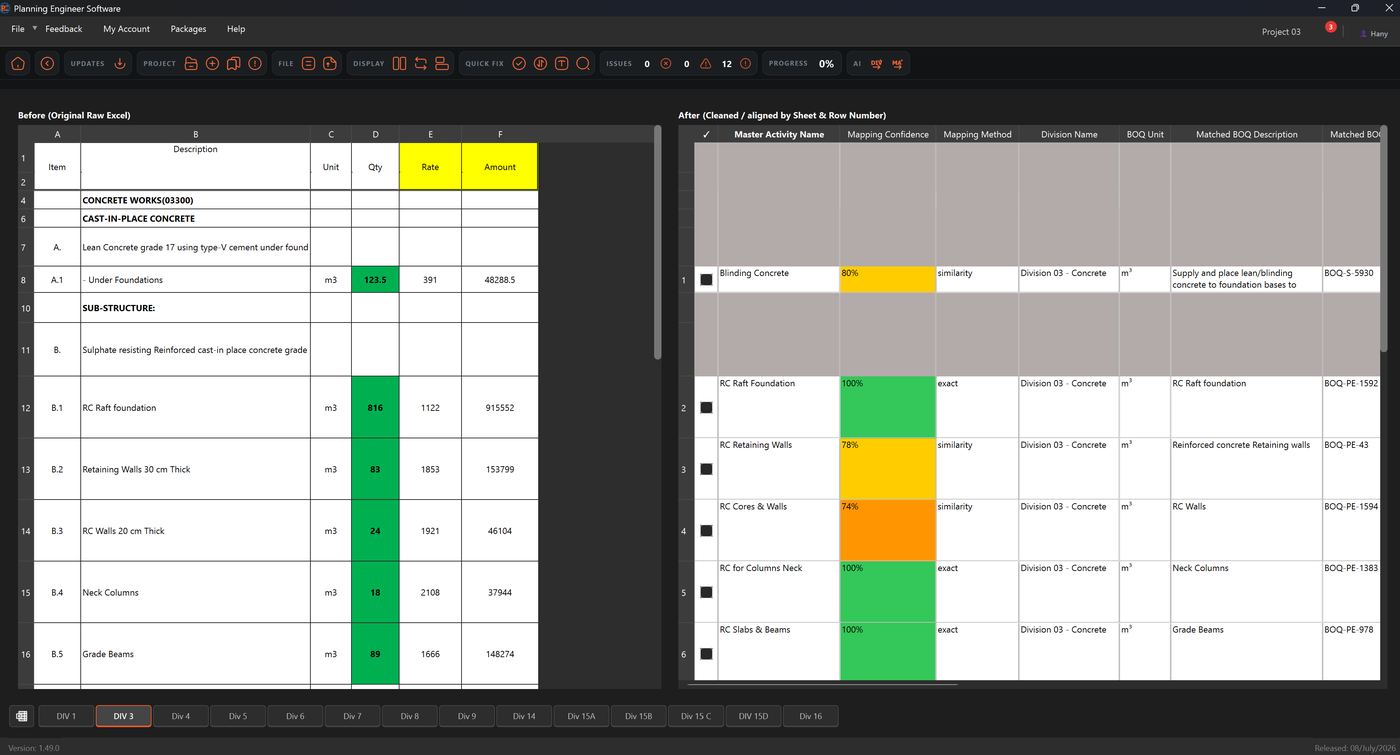
Stop mapping BOQ items by hand
Upload your raw, messy Excel BOQ exactly as it comes from the tender. PE Software cleans it, aligns it by sheet and row, and matches every line to a master activity — with a visible confidence score so you always know what to double-check.
- Automatic matching with exact and similarity-based confidence scoring
- Division and unit auto-detected for every matched item
- Review and confirm matches in one screen — before vs. after, side by side
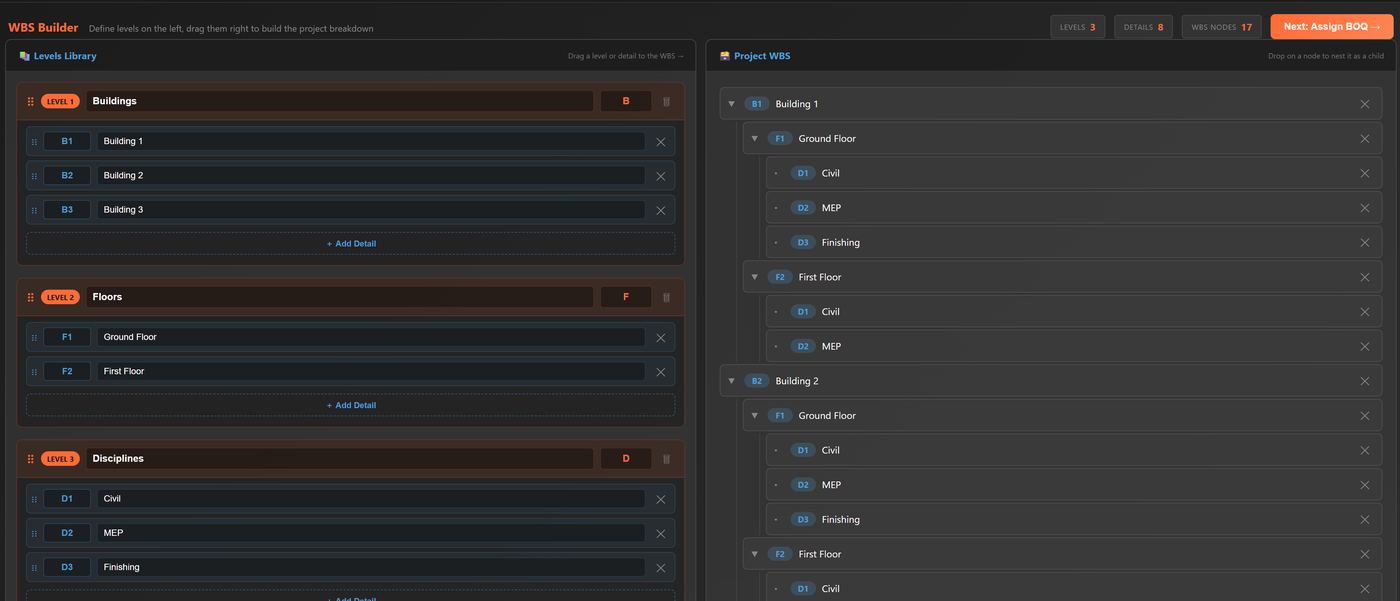
Build your WBS by dragging, not typing
Define your levels once — buildings, floors, disciplines, or whatever structure your project needs — then drag them into place to build a complete, nested work breakdown structure in minutes.
- Reusable levels library for faster setup on your next project
- Unlimited nesting: buildings → floors → disciplines → details
- Live counters for levels, details, and total WBS nodes as you build
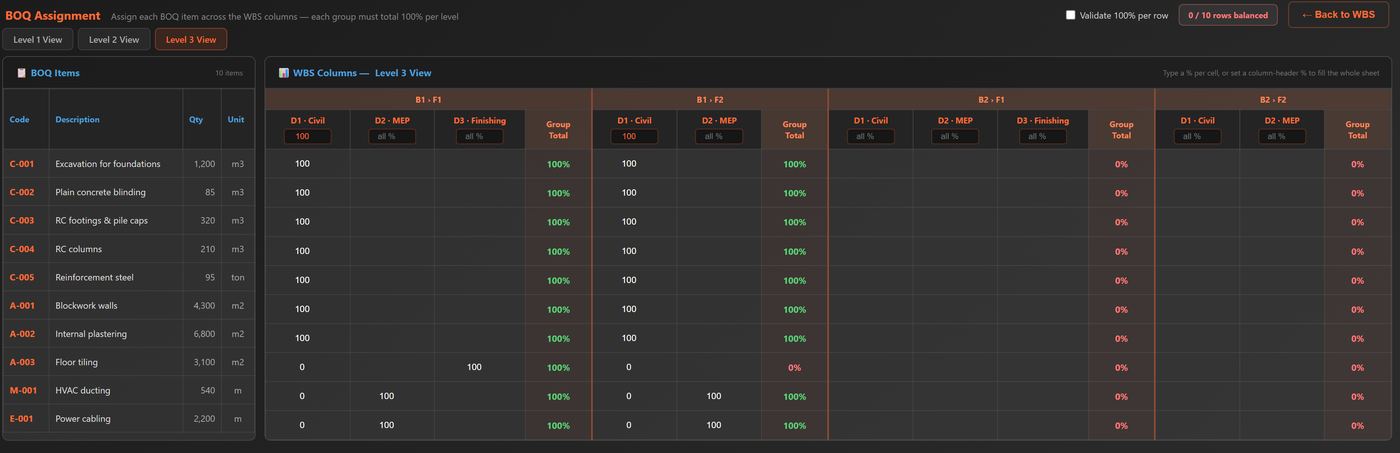
Distribute quantities across your WBS with confidence
Assign every BOQ item across your WBS columns by percentage, with a running group total that turns green the moment a row balances — so nothing slips through at 90%.
- Switch between Level 1, 2, and 3 views instantly
- Fill an entire column with one value, or fine-tune cell by cell
- Built-in validation flags unbalanced rows before you move on
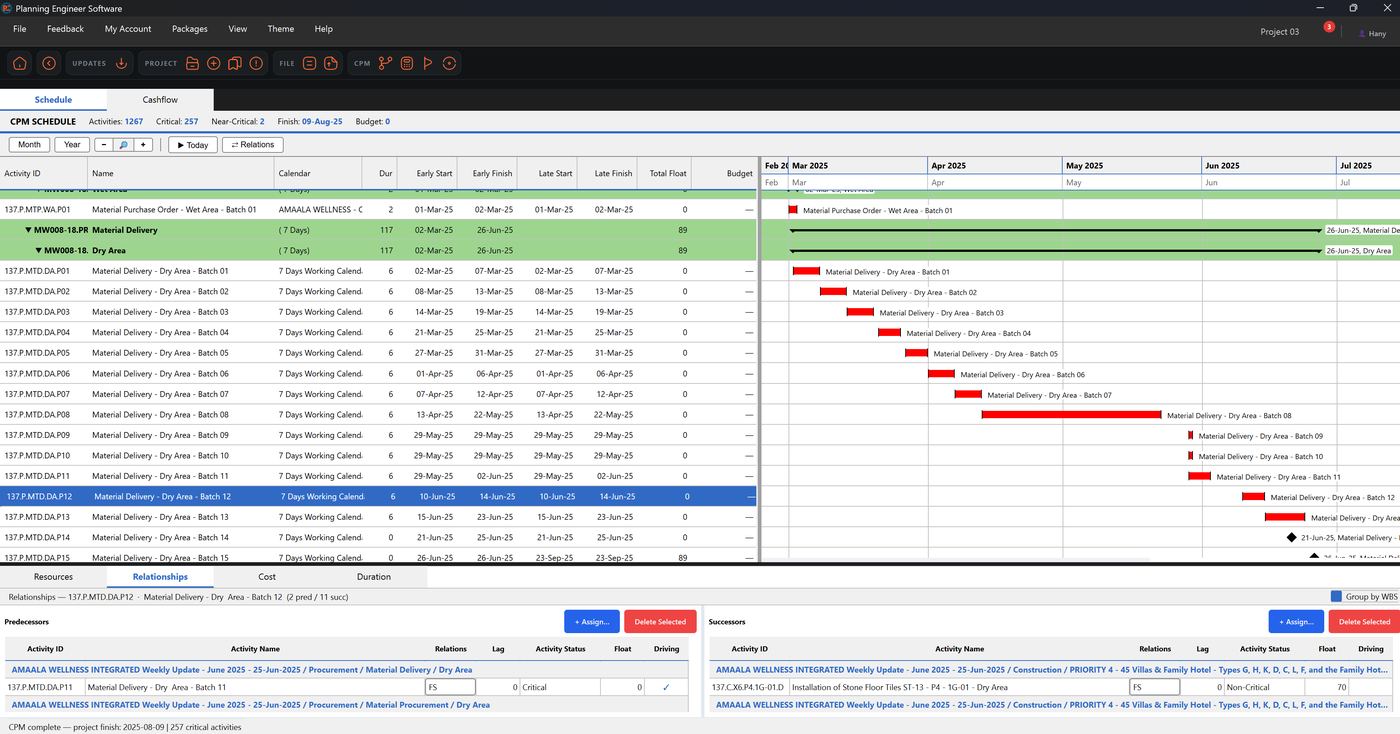
A full CPM engine, not just a spreadsheet
Once your baseline is built, PE Software calculates your critical path automatically — complete with a Gantt chart, relationships, float, and cost/resource views, just like the schedule software you already know.
- Automatic Early/Late Start & Finish, Total Float, and critical path
- Predecessor/successor relationship management, grouped by WBS
- Resources, Cost, Duration, and Relationships in one workspace
8
guided steps from raw BOQ to finished baseline
1
workspace instead of Excel + P6 + email chains
Auto
critical path, relationships & durations
Built-in
schedule health check before you submit
Update progress faster and keep your projects safe
Beta 2 adds a Progress Update Tool for Primavera P6, encrypted project export & import, and a faster, more reliable baseline flow.
Progress Update Tool
Update your Primavera P6 projects faster, with checks and warnings that help you review the progress before applying the update.
Update straight from P6 or XER
Connect directly to the P6 SQLite database, update an XER file, or update one XER file using progress data from another XER file.
Edit progress your way
Edit progress directly inside PE Software, or export progress data to Excel for site updates.
Project Export & Import
Export your project as an encrypted .peproj file to your PC for backup or manual transfer, then import it again into PE Software.
Enhanced baseline flow
Improved WBS handling and totals, BOQ filters, allocation controls, EPS editing, Planning Knowledge Bank synchronization, and overall workflow and performance.
Wider P6 compatibility
Support for newer Primavera P6 versions and UTF-8 XER files, improved resource calculations, additional warnings and validation checks, and bug fixes.
Thousands of BOQ items, already standardized
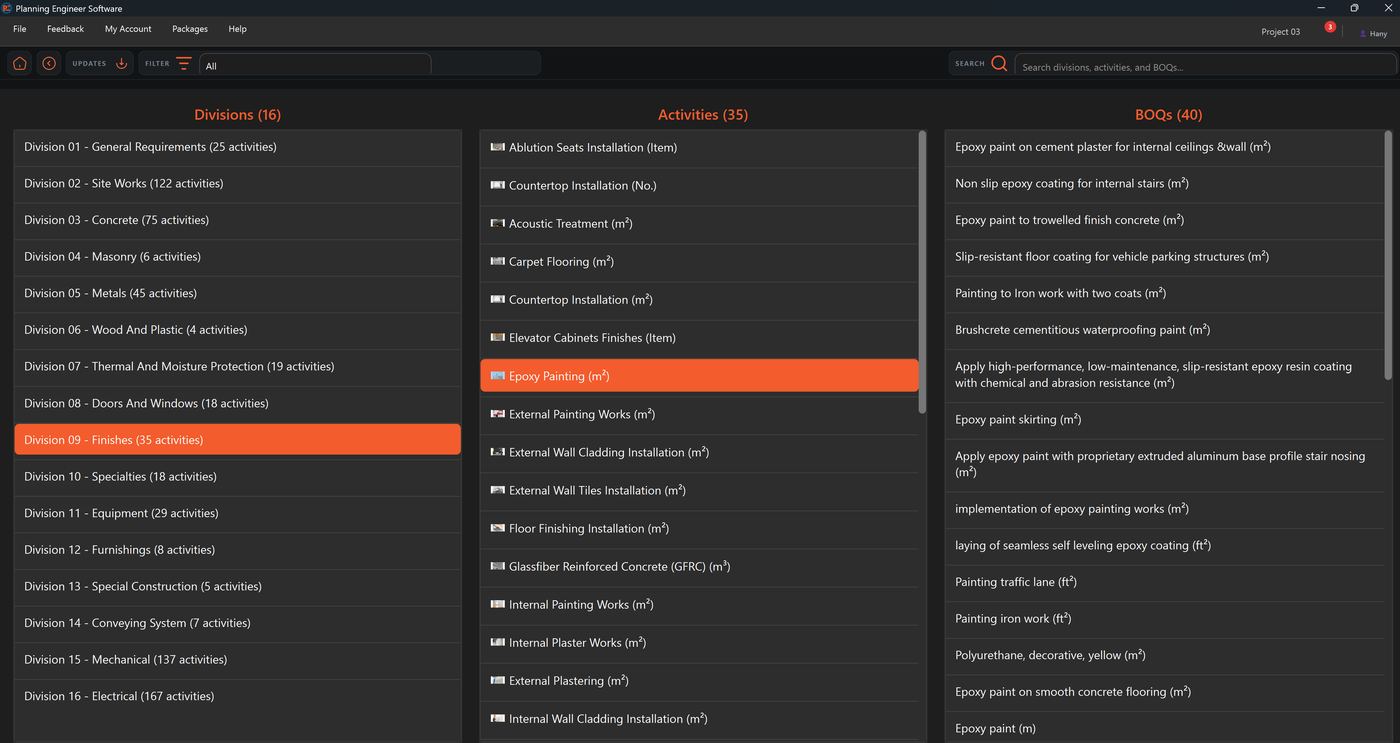
The Planning Bank is a built-in library of thousands of BOQ items — each one already mapped to a master activity, with productivity and duration standards per unit and predecessor/successor logic attached. Browse it to learn how a well-built baseline is structured, or copy it as the starting point for your own project or company standard.
Every division, activity, and BOQ item in one library
Search or filter across 16 divisions of work, from Concrete and Finishes to Mechanical and Electrical. Each division links straight through to its activities and every BOQ description mapped to them.
- 16 divisions covering thousands of standardized activities and BOQ items
- Search across divisions, activities, and BOQ descriptions at once
- See exactly which unit (m³, m², ft², item, etc.) each BOQ item is measured in
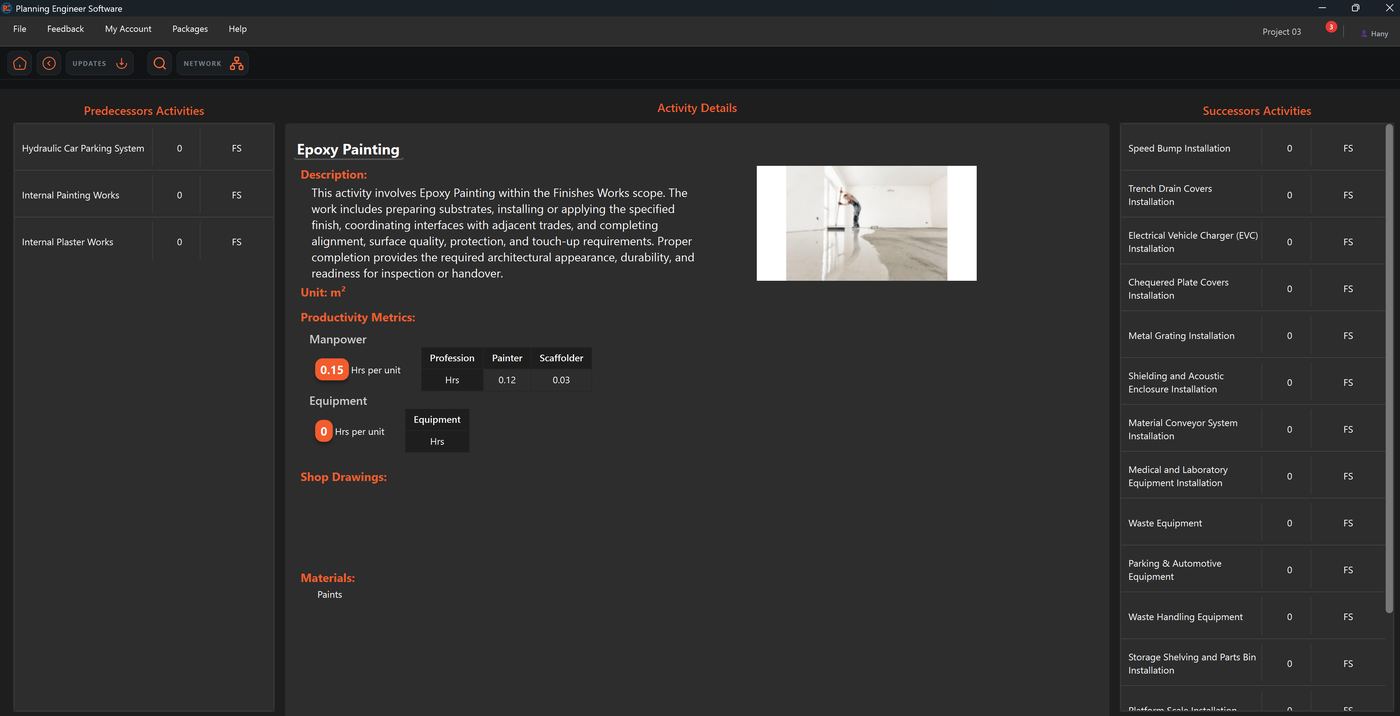
Productivity standards and logic, ready to reuse
Open any activity to see its full profile: a written scope description, manpower and equipment hours per unit, required materials, and its typical predecessor and successor activities — the same logic ties used to auto-build your schedule.
- Manpower & equipment productivity rates (hours per unit) by profession
- Typical predecessor and successor activities with relationship type
- Materials and scope description for every master activity
A learning tool for planners
New to planning or a specific trade? Browse real productivity rates and logic ties used across thousands of activities instead of guessing at durations.
A starting point, not a straitjacket
Copy any activity’s standards into your project and edit them freely — the Planning Bank is a baseline you adjust to your own site conditions and history.
A company standard, enforced
On the Company plan, Directors can lock the Planning Bank as the mandatory source of productivity, duration, and logic — so every project across the company plans the same way.
Faster baselines from day one
Every activity you map already comes with realistic durations and relationships attached, cutting out hours of research per project.
Two more modules, built on your Baseline
The Baseline Package is just the start. Two more modules are on the way — both reading directly from the WBS, activities, and durations you’ve already built, so there’s nothing to rebuild or re-import.
Reporting Module
Turn your baseline and live progress updates into dashboards, S-curves, and stakeholder-ready reports — generated straight from the schedule you already built, with no manual re-entry.
EOT Claims Module
Build Extension of Time claims from your baseline and as-built data: compare planned vs. actual, isolate delay events, and generate a supported EOT narrative — using the same activities, relationships, and durations already in your project.
Simple pricing for individuals and companies
Start with a free trial, then choose the plan that fits how you work.
- Full Baseline Package — all 8 workflow steps
- Built-in CPM scheduling engine
- BOQ auto-mapping with confidence scoring
- Full access to the Planning Bank — browse, learn from, and copy thousands of standardized activities
- XER health check & narrative report
- Free trial included
- Everything in the Individual plan
- Role-based user permissions: Director → Manager → User
- Directors assign Managers; Managers assign users to projects as view-only or view/edit
- Company Planning Bank — lock in your own standardized productivity rates, relationships, and durations across every project
- Centralized control over who can see or edit each project
Stop rebuilding your baseline from scratch every project
Download the beta, activate it with key ALLINONE-G83QFD-6PC0IJ, and go from raw BOQ to a validated, CPM-calculated baseline — all in one workflow.
Download PE Software Beta
Download and install PE Software, then activate it with this beta testing key:
ALLINONE-G83QFD-6PC0IJ
