

The Earned Value Cost does not equal the Actual Cost.
In Primavera P6, where Actual Costs do not equal the Earned Value Cost after updating the schedule. It can be due to several factors. Here are a few reasons why this might happen.
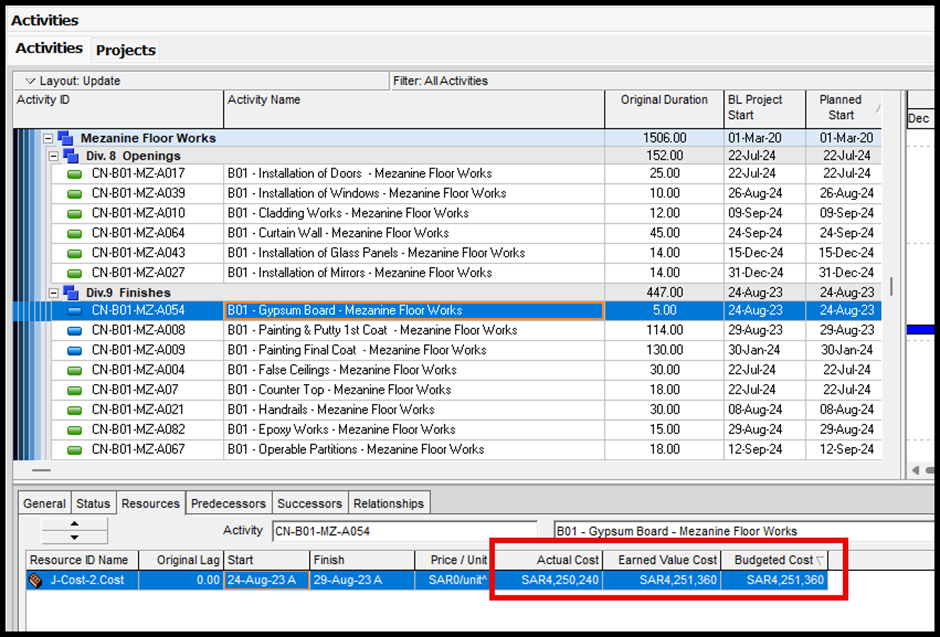
In the following image, the “ B01 – Gypsum Board – Mezzanine Floor Works ” activity Started, Finished, and has 100% of the Activity % Complete.
This Activity Resource has an Actual Cost that differs from the Budgeted Cost and Earned Value Cost also.
Ready to take your skills to the next level? 🚀 Check out our Special Online Courses! 🚀
Gain valuable insights, boost your career, and learn from industry experts.
Since we know that this Activity is 100% Completed, the Actual Cost must equal the Budgeted Cost and the Earned Value.
Reasons that Make Actual Cost Not Equal the Earned Value
Since the Actual Cost is automatically Calculated by Primavera P6 the following may be the reason
1. Earned Value (EV):
Earned Value is a project management metric, that helps assess how much value has been earned from the work completed to date, compared to the planned cost. It is a representation of the work performed.
The basic formula for Earned Value in Primavera P6 is:
EV = %Complete × Planned Value (PV)
2. Actual Cost:
Cost Control for Construction Projects
Course WhatsApp Support Group All enrolled trainees get an invitation to the course WhatsApp support group, where our team answers your questions…
- 814 students
- WhatsApp support group
- Certificate
In Primavera P6, Actual Cost refers to the total amount of resources (labor, material, equipment) that have been consumed to date. This is tracked against the resources that were planned or budgeted. Actual Cost helps in comparing the actual resource usage against the planned or baseline resource usage to identify any variances.
In Primavera P6:
· Actual Labor Cost would track the actual hours worked by the team.
· Actual Material Cost would track the quantity of materials used.
· Actual Equipment Cost would track the equipment hours used.
1. Different Basis for Calculation:
Actual Units: These are based on the physical work performed and the resources consumed, As (labor, material, equipment), and they are mainly manually Imported.
Earned Value Cost: This is a financial metric based on the value of work performed, Earned Value Cost is calculated using budgeted Cost rather than Actual Cost.
Price/Unit Calculation: The approach to entering the price per unit can differ between users. Some users input the actual price per unit and let Primavera calculate the total cost by multiplying it by the number of units. Others may choose to enter “1” as the price per unit, manually calculating and adjusting the total cost outside of Primavera.
2. Cost Loading:
If the Actual Cost is not properly imported to P6, Then the Earned Value Cost might differ from the actual Cost.
3. Baseline Settings:
The baseline might be set differently from the current schedule, But if the Budgeted Total Cost is different than the Current Schedule or the Budgeted Labor Units, it will be affecting the calculation of Earned Value Cost. Then if the baseline costs or resource assignments are different from the updated schedule, the EVC could differ.
To diagnose and correct this issue
Review Resource Assignments: Ensure that the correct cost rates and units are being used.
Check Baselines: Make sure that your baseline data is correct and that your current schedule is correctly aligned with your baseline.
Re-Import the Actual Cost: Adjust the methods used to Import the Actual Cost if needed to better reflect actual performance.
But if want to know how to solve the problem in P6, This article “ Actual cost not calculated automatically” will help you the most.
Download the Resources of this Article
The Earned Value Cost does not equal the Actual Cost. 219.22 KB 1064 downloads

Keep in Touch
Join our Email Newsletters and receive FREE weekly useful content!

Keep growing with Planning Engineer
Learn with a clear path
From Primavera P6 basics to claims, cost control and Power BI. Start with our free courses.
Browse coursesGet help on WhatsApp
Every course comes with a private WhatsApp support group where our team answers your questions.
Join a courseFind planning jobs
117 open planning and project control jobs. Post your resume so employers can find you.
See jobsGet tips by email
Free planning tips, templates and course offers. Unsubscribe any time.
Related posts:
 Understanding Merge Hotspot, Diverge Hotspot, and Logic Hotspot in Project Scheduling
 How to connect Primavera P6 to Power BI (Full Guide)
 How to Copy Progress Updates from one Project to another
 Small Business Management (Feasibility Study Excel Template)
 Why Project management and project management plan

You may also like

How to Minimize Total Float in Construction Activities

